Run restaurant payroll with confidence. Learn how to handle tips, taxes, overtime, and compliance without costly mistakes.

Running restaurant payroll can be complicated. You’re managing tipped wages, variable schedules, multiple pay rates, and overlapping federal, state, and local rules. This guide focuses on the practical side of restaurant payroll, where issues tend to show up in real operations, and what it takes to build a payroll process that holds up week after week without creating compliance headaches.
And when it comes time to handle payroll tax work, tools like TurboTax can make a meaningful difference. TurboTax helps by preparing W-2s and 1099s, identifying applicable tax credits, and providing guided support to help reduce manual work and filing errors. Sign up for TurboTax to streamline tax filings for your business.
Visit TurboTaxRestaurant payroll has layers of complexity that other industries don’t face. Here’s what makes it different.
Taken together, these factors explain why restaurant payroll can’t follow a generic payroll playbook. It requires closer attention to detail, stronger documentation, and systems that can adapt to frequent change without losing accuracy. Understanding what makes restaurant payroll different is the foundation for building a payroll process that stays compliant and reliable in day-to-day operations.
Before processing your first restaurant pay run, you have to get the legal basics in place. Payroll compliance determines how wages are calculated, whether tip credits are valid, and how payroll records must be maintained.
Below are the core legal requirements that affect restaurant payroll:
Payroll compliance starts with proper registration. If you operate in more than one state or city, each location may have different registration requirements, tax rates, and filing schedules.
At a minimum, restaurants must have:
If you use payroll software or plan to purchase one, ensure that the system can be configured by location so wages, taxes, and reports are applied correctly.
Before an employee appears on payroll, they must be correctly classified and properly onboarded. Classification determines how payroll taxes are handled, which forms are required, and what wage and hour rules apply. If you control when, where, and how the work is performed, the worker is generally considered an employee under Internal Revenue Service (IRS) and Department of Labor standards, subject to multi-factor tests.
Once classification is confirmed, payroll onboarding requires collecting and retaining the required documentation, including:
These forms directly affect how payroll calculates withholdings and issues pay. Missing or incorrect paperwork can lead to underwithholding, overwithholding, delayed pay, or compliance issues later.
Minimum wage is the baseline for payroll. In restaurant payroll, you’re allowed to use a tip credit, which means you can count a portion of an employee’s tips toward meeting the minimum wage. Whether you can use a tip credit and how much you can apply depends on the state where your business operates.
For example, the federal minimum wage is $7.25 per hour, with a tipped minimum wage of $2.13 per hour. In states that follow the federal standard, you may pay the $2.13 cash wage and rely on the employee’s tips to make up the remaining $5.12 (as a tip credit), provided the total hourly earnings still reach at least $7.25. If the employee’s reported tips aren’t enough, you must adjust the tip credit so the employee receives the full minimum wage.
Don’t forget to check state tip credit rules. Some states, such as California, Montana, and Nevada, consider tips to be extra income on top of the minimum wage. Others, like New York, Florida, Ohio, and Massachusetts, have their own tip credit calculations.
Under federal law, a tip credit generally applies to employees working in a tipped occupation. It cannot be applied to time spent working in a separate, non-tipped occupation. State and local rules may be stricter and can limit how tip credits apply to certain non-tipped duties, so policies should be reviewed based on each location.
To use a tip credit, you must:
If these conditions aren’t met, you must pay the full minimum wage for all hours worked.
Also read:What Is a Tip Out? A Guide to Restaurant Tipping Methods
Overtime applies when a non-exempt employee works more than 40 hours in a workweek, unless state or local law sets a lower threshold. At the federal level, overtime is paid at 1.5 times the employee’s regular rate of pay. When an employee works multiple roles at different pay rates, the regular rate must be calculated using a weighted average of all rates worked during the week.
Payroll records are what support every wage decision you make. These should be organized, accessible, and consistent across pay periods so they can support your payroll decisions if questions arise from employees, auditors, or regulators.
At a minimum, payroll documentation should include time records, tip reports, pay stubs, and payroll tax filings. Federal law generally requires payroll records to be retained for at least three years; however, some states may require longer retention periods.
Restaurant payroll taxes are layered, involving responsibilities for both employees and employers, with tipped income adding further complexity. Understanding which taxes apply, who pays them, and how they’re calculated helps you avoid underpayments, penalties, and reconciliation issues at year-end.
Here’s how the core payroll taxes apply.
These are the standard taxes employers track on payroll. A few others exist, such as the additional 0.9% Medicare withholding for high earners, which affects only employee withholdings and not the employer share.
Payroll tax accuracy matters most at filing time, when quarterly and annual forms have to reconcile cleanly with what was run through payroll during the year. TurboTax helps by walking you through tax filing step by step and flagging inconsistencies before forms are submitted.
It also offers access to tax experts for guidance on managing payroll taxes and reviewing tax forms before filing. TurboTax even lets you sign up for free, and will only charge fees when you’re ready to file.
Visit TurboTaxOnce your payroll setup, legal requirements, and tax rules are in place, running payroll becomes a repeatable process. The key is consistency. Each pay run should follow the same sequence so that wages, tips, overtime, and taxes are calculated consistently every time.
Here’s how restaurant payroll typically works from start to finish.
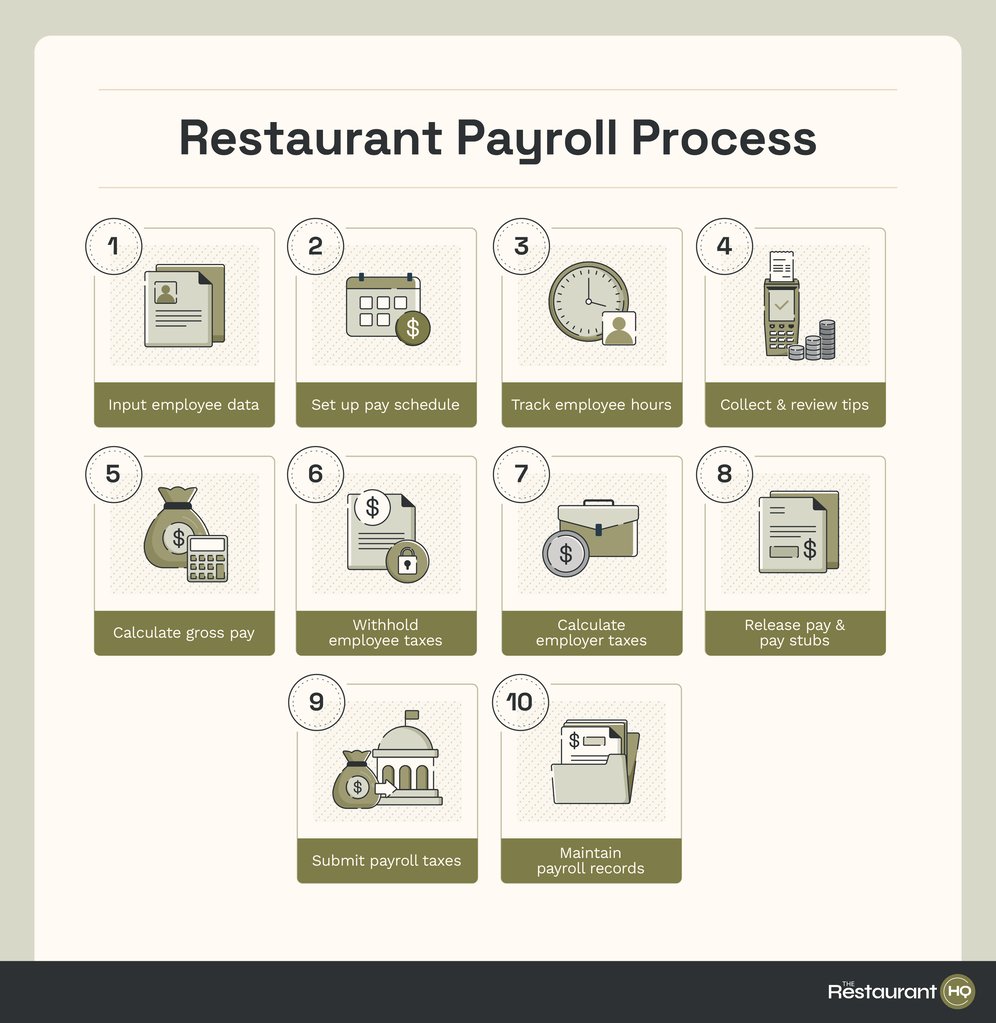
Payroll starts with ensuring that you have accurate employee and pay information. If you have new hires who need to be paid for the pay period, ensure that you have all their details, like the W-4 form for tax withholding and direct deposit information for easy payouts. In case of pay updates, double-check that new rates or job roles have been added to your employee database or payroll software.
A pay period or pay schedule determines how often employees are paid and what work period each paycheck covers. This matters because hours and tips change week to week, and delays or inconsistencies can quickly create frustration or compliance issues.
While most restaurants follow a weekly or biweekly schedule, you should check state pay frequency laws, which may require wages to be paid within a specific number of days after the pay period ends. Once a schedule is set, it should be applied consistently to all employees unless state law allows otherwise.
You need a reliable way to capture all hours worked, including opening prep, closing duties, and split shifts. If employees work different roles at different pay rates, those hours must be tracked separately so payroll can apply the correct rate and calculate overtime properly.
Employees must report all tips they receive, including both cash and credit card transactions. While credit card tips are typically automatically tracked by a point-of-sale (POS) system, employees are still responsible for reporting cash tips. Watch for inconsistencies between sales and reported tips, as these can signal reporting issues that create tax problems later.
Gross pay is the total amount an employee earns before taxes and deductions. For most restaurant employees, this usually includes hourly wages, overtime, and reported tips.
The basic formula is:
Gross Pay = (regular work hours × hourly rate) + ((overtime hours × 1.5) × hourly rate) + reported tips
Several factors can alter this calculation, including state-specific overtime regulations, using a weighted average when an employee has multiple pay rates, and if the restaurant worker is not eligible to receive tips.
From gross pay, you must withhold federal income taxes and the employee’s share of FICA taxes. Any applicable state or local income taxes will need to be applied, as well as other deductions for benefits and wage garnishments.
In addition to employee withholdings, you need to compute the employer-paid taxes. These include the employer share of FICA taxes, FUTA, and state unemployment taxes. While these amounts don’t come out of employee pay, they still need to be calculated and remitted on schedule.
Once you have withheld all the employer- and employee-related taxes, including other deductions, the remaining amount will be the net pay. You can then pay your staff via check or direct deposit.
Pay stubs for that specific pay run should also be released. It should clearly show hours worked, pay rates, tips reported, deductions, and year-to-date totals so employees can understand how their pay is calculated.
These forms can be manually printed pay stubs that you distribute to employees. But if you use a payroll system, your team can simply access a digital version from an online self-service portal.
Employee and employer payroll taxes must be paid to the appropriate agencies on their required schedules. This includes filing the necessary tax forms, including year-end tax reports. Missing deadlines can trigger penalties and interest, so ensure that your payroll calendars are up-to-date with the reminders set up.
After payroll is processed, records should be saved and organized. This includes time records, payroll reports, pay stubs, and tax summaries generated during the pay run.
Year-end payroll is where all the payroll activity you’ve run throughout the year is reconciled and reported. For restaurants, this step is especially important because tips, variable wages, and frequent staff changes increase the risk of discrepancies if records aren’t aligned.
Here are the key tasks:
Before issuing W-2s, you should review payroll totals to ensure they match quarterly payroll tax filings. Discrepancies between W-2s and Form 941 filings are a common trigger for IRS notices.
Form 940, which reports federal unemployment tax (FUTA), must also be filed annually. You should check if FUTA was only applied to the first $7,000 of wages per employee.
TurboTax guides you through required forms, helps prepare W-2s and 1099s, and checks for common errors before submission.
For restaurants, it helps align payroll data with annual tax filings, reducing manual entry and making sure payroll-related credits are identified where applicable. To learn more, check out its website.
Visit TurboTaxOnce you understand how restaurant payroll works, the next decision is whether you want to manage those steps manually or rely on software to handle them consistently. For most restaurants, payroll systems aren’t just about paying employees. They’re about managing tips, tracking multiple pay rates, staying compliant across locations, and reducing the risk of costly mistakes.
Not all payroll systems are built with restaurants in mind. At a minimum, a restaurant-friendly system should handle:
Depending on your company’s size and structure, these additional features can save time and reduce manual effort:
These features aren’t mandatory, but they can significantly reduce payroll headaches as your operation grows.
If you’re looking for a new payroll system or planning to switch providers, check out our list of the best restaurant payroll software to find suitable options.
Yes, but it requires careful manual tracking of hours, tips, tax rates, and filing deadlines. It also depends on the size of the business, so I only recommend it for very small teams. Manual payroll increases the risk of calculation errors and missed filings, which is why most restaurants eventually move to payroll software as operations grow.
Yes. When a restaurant has a tip-pooling or tip-sharing arrangement and distributes pooled tips to employees, those distributed amounts are still taxable income. Payroll must include those tip amounts when calculating taxable wages and withholding the appropriate payroll taxes. Employers should keep clear records of how tips were pooled and distributed to support tax reporting.
No. Service charges are not tips for payroll tax purposes. The IRS treats service charges (like automatic gratuities) as regular wages, not employee tips. That means they must be included in payroll and are subject to all payroll taxes, such as FICA and income tax, just like regular wages. True tips, in contrast, are amounts the customer voluntarily gives directly to the employee.

Restaurant HQ is your headquarters for restaurant business advice from industry experts. Learn how to start, run and grow any food and beverage business.
Property of TechnologyAdvice. © 2026 TechnologyAdvice. All Rights Reserved
Advertiser Disclosure: Some of the products that appear on this site are from companies from which TechnologyAdvice receives compensation. This compensation may impact how and where products appear on this site including, for example, the order in which they appear. TechnologyAdvice does not include all companies or all types of products available in the marketplace.


![Restaurant Accounting Guide: Best Practices, Tools & Tips [+ Free Checklist]](https://assets.therestauranthq.com/uploads/2025/12/trhq-1222025-restaurant-accounting-guide.jpg?w=1024)