


Running a restaurant today isn’t just about the food. It’s also about how you present your restaurant and offerings online. When someone is deciding where to book dinner, they’ll almost always check your website first. Even back in 2019, 77% of diners visit a restaurant’s website before making a reservation, and more than half say they’re discouraged if the site looks outdated or doesn’t show a clear menu.
Fast forward to now, the diner journey clearly starts online. For instance, the majority of full-service operators (69%) reported having a website for their restaurant, according to a 2025 TouchBistro report. Operators with three to 20 locations were even more likely to have a website, with 74% reporting that they did.
I’ve worked with restaurant owners who pour their energy into their food, staff, and hospitality, but their online presence lags behind. A poorly designed website can lose you customers before they even walk in the door. The good news? Squarespace gives you professional-grade templates that make it easy to create a site that looks polished, works well on mobile devices, and highlights what makes your restaurant special.
In this guide, I’ll walk you through the best Squarespace restaurant templates, show you what makes each one stand out, and help you choose the right one for your type of business.
Why Squarespace is a strong choice for restaurant websites
As a small business consultant, I often recommend Squarespace to restaurants because it balances ease of use with restaurant-focused features related to menus, reservations, and online ordering.
- You can build interactive menu pages or upload PDFs. Your menu is the most-visited page on a restaurant website. Guests don’t just want to see what you serve — they expect it to be current and accessible on mobile.
According to the TouchBistro report, 38% of diners are spending less overall after menu price increases. That makes menu transparency more important than ever. An interactive menu that clearly shows specials, pricing, and dietary options helps build trust and encourages bookings. - Reservations are made simply by built-in integrations with Tock or OpenTable. Having reservation features built directly into your website is critical because today’s guests expect frictionless booking.
According to the TouchBistro report, 28% of operators planning to increase their tech budgets say they’ll invest in a reservation platform in the next six months. Pair that with the fact that 58% of operators reported an increase in diner traffic in 2024, and it’s clear: If your website doesn’t let customers book a table instantly, you risk losing them to competitors who do. - Restaurants can enable online delivery easily by connecting Squarespace Commerce with delivery or pickup. Off-premise dining isn’t slowing down. In the TouchBistro report, 82% of operators reported an increase in takeout and delivery sales compared to last year, with average sales rising 32% year-over-year.
By integrating online ordering directly into your website, you capture more of this growing revenue stream without relying solely on third-party apps. - Squarespace templates are mobile-first by default. This is extremely important because an often-cited Think with Google study reveals that 89% of dining research is done on a mobile before guests visit a restaurant. A mobile-optimized site ensures that takeout and delivery orders placed from phones are seamless, boosting conversions.
- Squarespace templates have an SEO-friendly setup. Built-in tools help with local SEO, a big driver for foot traffic. Local visibility is crucial. The TouchBistro report shows 58% of operators saw increased diner traffic in 2024. A site optimized for search ensures that when nearby guests look for a place to eat, your restaurant shows up ahead of the competition.
- Squarespace templates are easy to use. I have personally tested and used Squarespace in setting up ecommerce websites and have found it a straightforward plug-and-play platform. I’ve seen small bistros and larger dining groups alike use Squarespace to maintain sleek, user-friendly sites without relying on expensive developers.
My recommended Squarespace templates for restaurants
With so many Squarespace templates available, it can be tough to know which one fits your restaurant best. I’ve narrowed it down to the designs that consistently work well for food businesses — templates that balance style with function, highlight your menu and atmosphere, and make reservations or online orders easy for guests.
Here’s a quick comparison of my top picks so you can see, at a glance, which one aligns with your restaurant’s needs.
Best Squarespace restaurant templates compared
| Template | Best for | Standout feature |
|---|---|---|
| Palmer | Fine dining, wine bars, tasting menus | Elegant hero imagery with reservation CTA |
| Juniper | Casual dining, cafés, multi-location groups | Flexible stacked layouts with photo-driven menus |
| Auburn | Trend-driven cafés, brunch spots, cocktail lounges | Bold, full-width visuals and storytelling sections |
| Vance | Food trucks, pop-ups, small restaurants | One-page scroll with built-in CTAs |
| Belisa | Bakeries, bistros, dessert shops | Grid-based galleries with integrated menus |
| Atlantic | High-end casual, modern restaurants, upscale cafés | Large homepage slideshow for signature dishes |
| Hill | Chef-driven, farm-to-table, boutique restaurants | Bold typography and storytelling sections |
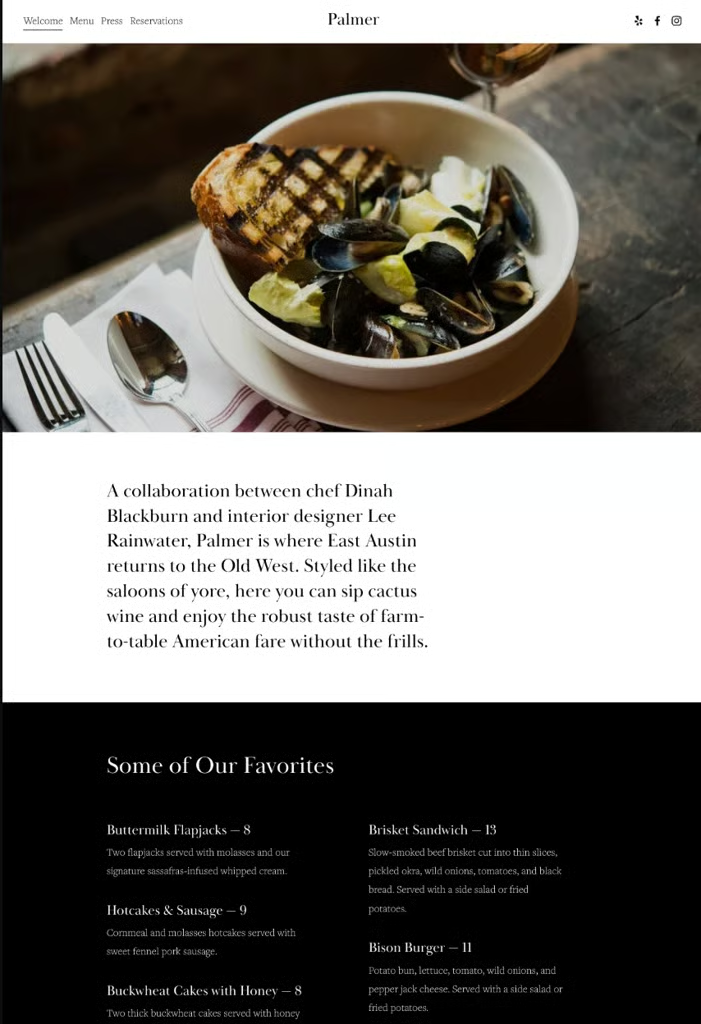
Palmer: Elegant design for fine dining
- Best for: Upscale restaurants, wine bars, tasting menus
- Standout feature: Bold imagery paired with simple typography
- Impact: Creates a polished first impression that reflects fine dining quality
Palmer is a minimalist, sophisticated template that highlights food photography and atmosphere. It features structured menu layouts, a press and testimonial section, and a clean reservation button powered by Tock.
Why I like it: It balances elegance with usability; your visuals shine without overwhelming the guest.
Juniper: Flexible layout for casual dining
- Best for: Casual dining, cafés, multi-location groups
- Standout feature: Flexible, photo-driven menu layouts
- Impact: Keeps content organized while highlighting seasonal changes
Juniper offers a modern, versatile layout with stacked sections that make it easy to showcase menus, promotions, or updates. It’s simple to manage, even for restaurants that change menus often.
Why I like it: It adapts well to busy restaurants that need flexibility without losing structure.
Auburn: Bold visuals for trend-driven eateries
- Best for: Trendy cafés, brunch spots, cocktail lounges
- Standout feature: Striking full-width visuals
- Impact: Creates an Instagram-ready online presence
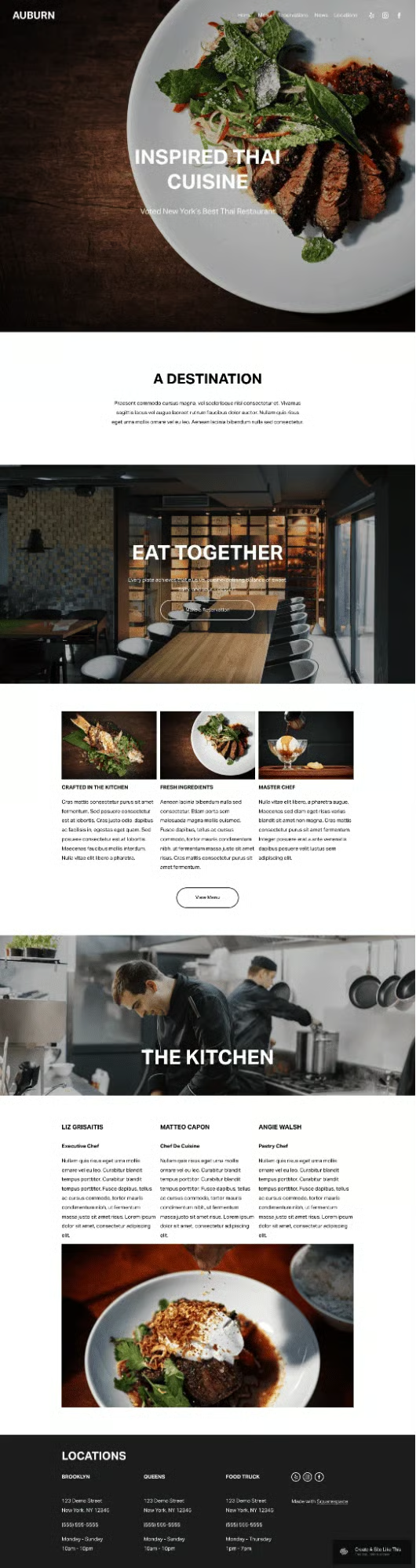
Auburn emphasizes full-width images and storytelling, perfect for brands that thrive on strong visuals and social buzz.
Why I like it: It’s built for restaurants that want to stand out online and attract a younger, design-conscious audience.
Vance: Simple one-page design
- Best for: Food trucks, pop-ups, hole-in-the-wall eateries
- Standout feature: Single-scroll structure with built-in CTA buttons
- Impact: Speeds up decision-making for guests on the go
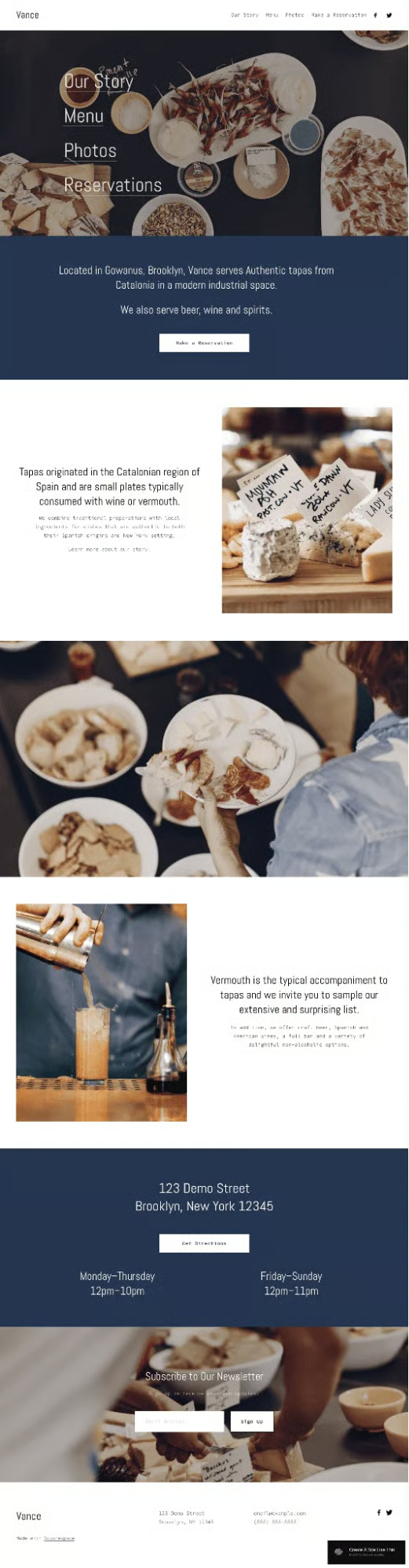
Vance is ideal for smaller restaurants, food trucks, or pop-ups that need a streamlined site. The one-page scroll setup ensures visitors see everything — menu, hours, and reservations — without clicking around.
Why I like it: It’s perfect for food trucks and pop-ups that need to build a site fast and update it often.
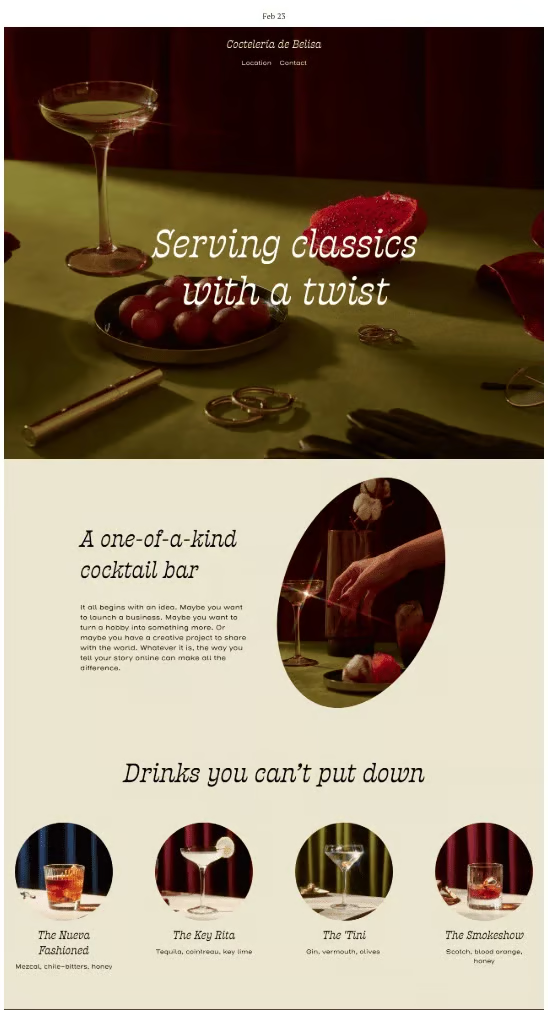
Belisa: Clean menus and gallery-driven layout
- Best for: Bakeries, bistros, dessert-focused restaurants
- Standout feature: Grid-based galleries with integrated menu sections
- Impact: Appeals to guests who decide based on visual presentation
Belisa combines simple navigation with gallery-focused sections, making it easy to display visually appealing dishes or baked goods.
Why I like it: It makes photography the hero of the site, which is ideal for bakeries and dessert shops.
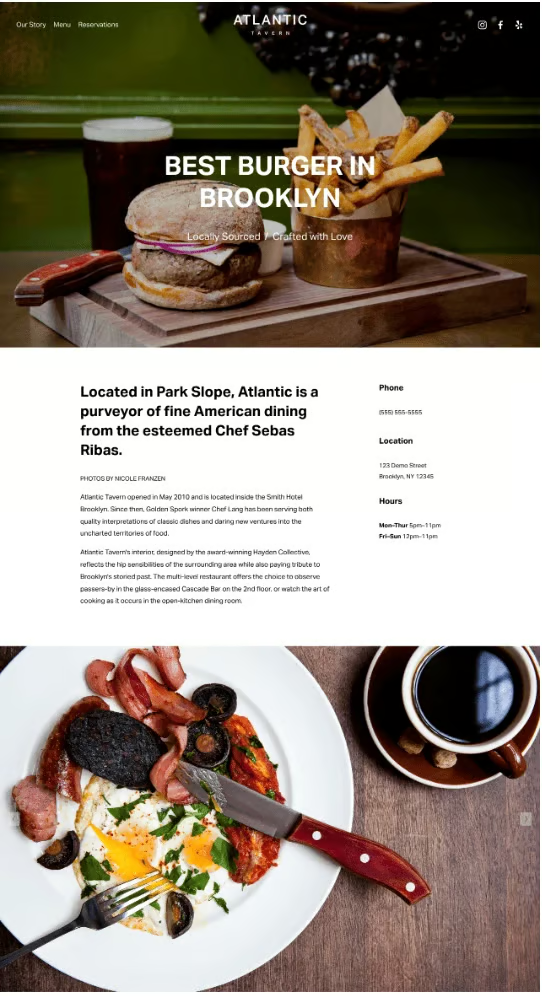
Atlantic: Polished design with strong visuals
- Best for: High-end casual, modern restaurants, upscale cafés
- Standout feature: Large header images for dishes or events
- Impact: Balances elegance with accessibility
Atlantic features a large image hero section for showcasing signature dishes, combined with a clean, modern layout that’s easy to browse.
Why I like it: It’s versatile enough for both upscale cafés and modern casual restaurants, with a polished but approachable look.
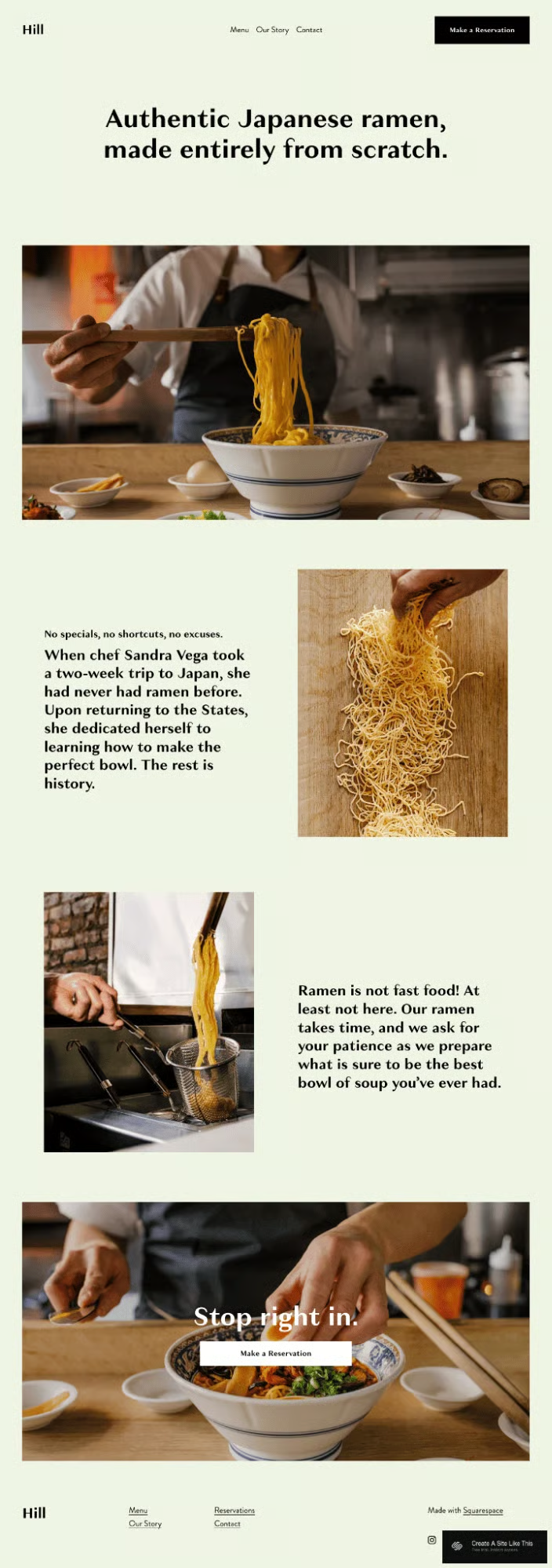
Hill: Bold layout for storytelling restaurants
- Best for: Chef-driven, farm-to-table, boutique restaurants
- Standout feature: Bold typography and storytelling sections
- Impact: Builds connection by highlighting brand personality
Hill uses strong typography and flexible sections for “About” stories, sourcing details, or chef features, making it a natural fit for brand-driven restaurants.
Why I like it: It gives restaurants space to tell their story while keeping design sleek and modern.
How to choose the right Squarespace template for your restaurant
When I work with restaurant owners, I don’t just tell them which template to pick — I walk them through a process. Choosing the right design isn’t about what looks trendy, but what supports your business goals. I use a simple, four-step framework.
Step 1: Define your restaurant’s style
Ask yourself: Am I running a fine dining restaurant that needs a visual showcase, or a café that benefits from a functional, easy-to-navigate layout?
- Visual-first templates (like Palmer, Belisa, or Atlantic) highlight photography and atmosphere.
- Functional templates (like Juniper or Vance) make it easy to update menus and guide guests quickly to ordering or reservations.
Step 2: Identify your main website goal
Your template should match your primary objective. I usually frame it in one of two scenarios.
- If your top priority is filling tables, choose a design with a strong reservation call-to-action (Palmer, Hill).
- If you want to drive online orders, pick a template that emphasizes menus and integrates well with delivery links (Juniper, Vance).
Step 3: Plan for growth
Think beyond today’s needs. For example, 49% of operators in the TouchBistro report planned to expand into catering in 2025. If you expect to add events, catering, or private dining, go with a flexible template (Hill, Auburn) that can easily accommodate additional pages and sections.
Step 4: Match the template to your guest experience
Your website is an extension of your hospitality. If your restaurant thrives on storytelling, like a farm-to-table concept, you’ll want a template with space for an “About” or sourcing story (Hill). If you need fast decision-making, like for a food truck, a one-page layout (Vance) is more effective.
After you’ve chosen the right Squarespace template, the real work begins. Building your website is where your brand personality and business goals come to life. If you want a step-by-step walkthrough, I recommend reading our guide on how to create a restaurant website. It’s a practical guide that will walk you through everything from setting up pages to adding photos and connecting reservations.
For inspiration, you can also explore our examples of well-designed restaurant websites. Looking at how other restaurants present themselves online is one of the fastest ways to spark ideas for your own design.
Tips for optimizing your Squarespace restaurant website
Even the best template isn’t ready “as is.” To make your website work for you, you need to customize it for your brand and optimize it so guests can actually find you online. Here’s how I approach this with clients.
Make it visually authentic
The first thing I do is swap out demo images for professional food photography. Guests can spot stock photos instantly, and they don’t build trust. Showcasing your real dishes, dining room, and staff makes your restaurant feel approachable and authentic.
Related read: 12 Food Photography Tips for Restaurants
Add reservations and ordering
Next, I make sure reservations are built into the site. Platforms like Tock or OpenTable integrate seamlessly with Squarespace, and they’re becoming a top priority for operators. Delivery also can’t be overlooked — connecting DoorDash, Uber Eats, or Squarespace Commerce for pickup and delivery is revenue you can’t ignore.
Related reads:
- Pros & Cons of Delivery Services [+ How They Work]
- 6 Best Food Delivery Software for 2025
- 5 Best Delivery POS Systems for Restaurants in 2025
Use clear calls to action
Every website needs obvious next steps. Add buttons like “Book Now,” “Order Online,” or “Reserve a Table.” Don’t bury these in menus — make them visible on the homepage and above the fold so guests can act quickly.
Keep content fresh
I encourage restaurants to highlight seasonal specials, promotions, or events on their site. This could be as simple as a dedicated section or occasional blog posts. Fresh content doesn’t just appeal to guests — it also signals to search engines that your site is active and relevant.
Optimize for local SEO
Most diners will find you through local search, so optimization matters. Include keywords like “best sushi in Dallas” or “Italian restaurant in Boston” in your copy. Add descriptive alt text to every image (e.g., “artisan sourdough bread at XYZ Bakery”), and embed a Google Map for strong local SEO signals. Claim and update your Google Business Profile so your hours and location are accurate.
Finally, showcase customer reviews right on your site. According to BrightLocal, 98% of consumers read online reviews for local businesses in 2023, and featuring them builds credibility that nudges guests toward booking.
Related read: Local SEO for Restaurants: What It Is and 10 Tips for Success
Last bite
Your website is often the first taste a guest has of your restaurant. A strong Squarespace template makes sure that taste is inviting, accurate, and persuasive. So treat your website like part of the guest experience. A site that’s modern, clear, and easy to use helps diners trust you before they ever sit down.
If you’re ready, start by exploring templates like Palmer or Juniper and test them using Squarespace’s free trial. The right template can do more than make your site look good — it can bring more customers through your doors.
