Best Restaurant Employee Scheduling Software in 2026
Build accurate schedules in minutes, reduce overtime risk, and sync labor hours directly to payroll. I tested 12 restaurant scheduling apps and ranked the top seven using a weighted rubric that evaluated pricing, scheduling features, integrations, support, and real-world user feedback, with added emphasis on auto-scheduling and AI forecasting for 2026.
We may earn from vendors via affiliate links or
sponsorships. This might affect product placement on our
site, but not the content of our reviews. See our Terms of Use for
details.
The best restaurant scheduling software should help managers build schedules faster, prevent no-shows, control labor costs, and keep teams informed. The platforms below support shift swaps, PTO requests, labor forecasting, POS integrations, and payroll syncing so restaurants can staff confidently during busy and slow periods alike.
This year’s update includes refreshed pricing, expanded compliance analysis, updated mobile app evaluations, and deeper scoring for AI-driven scheduling and labor forecasting tools.
How I chose the best restaurant scheduling software and apps
I evaluated restaurant scheduling platforms using a weighted rubric that compares pricing, scheduling and labor management features, advanced restaurant tools, customer support, and overall usability, with a focus on shift management, labor compliance, POS integrations, and multi-location support. I also validated results through demos, free trials, help documentation, and user feedback. You can learn more about my methodology below.
Homebase: Best all-in-one restaurant scheduling software and app
Advertisement
7shifts: Best restaurant employee scheduling software for multiple locations and franchises
Deputy: Best restaurant employee software app for seasonal restaurants
Advertisement
SocialSchedules: Best for strong compliance tools
Sling: Best restaurant employee scheduling software for food trucks and small restaurants
Advertisement
When I Work: Best restaurant shift app for catering and special events
HotSchedules: Best for AI forecasting and above-store control
I chose HotSchedules
HotSchedules stands out when labor accuracy and risk reduction matter. Auto Scheduler speeds up building shifts, and AI forecasting helps right-size staffing against demand. The compliance layer and above-store dashboards make it a fit for brands with multiple locations or strict labor rules.
If you’re a single-location shop on a tight budget, a vendor with a free or low-cost entry plan may be a better starting point; otherwise, HotSchedules gives you forecasting, compliance, and multi-location control in one stack.
Who should use HotSchedules
HotSchedules works best for enterprise restaurant groups and franchises that need AI forecasting, labor compliance tools, and above-store operational visibility across multiple locations.
HotSchedules pricing
HotSchedules does not publish pricing on its site. Our sales contact quoted a starting price of $85 per month. A trial is available on a case-by-case basis through the sales team rather than being advertised publicly. Contact them for a quote.
HotSchedules standout features
AI forecasting + Auto Scheduler: Generates labor plans and recommends staffing; fills shifts based on roles, availability, and rules.
Compliance tools: Alerts for breaks, overtime, opening/min-rest, and predictive scheduling where required; audit trails for reviews.
Above-store dashboards: Multi-location roll-ups for KPIs, labor variance, and schedule performance; compare locations and spot issues quickly.
POS and payroll connectivity: Uses POS sales to inform staffing; exports/feeds to payroll and HR to cut manual entry.
Messaging and surveys: Broadcast announcements and pulse surveys to track sentiment.
Logbook and task lists: Daily shift notes, checklists, and completion tracking to keep teams aligned.
Mobile apps: Managers approve changes on the go; employees view schedules, swap shifts, and request time off.
Ease of use: Admins set locations, roles, and labor rules once, then schedule with templates and Auto Scheduler. Field leaders can review forecasts and exceptions from above-store views.
Support includes a customer portal and regional phone/chat options, and most teams lean on the Logbook to standardize shift execution. Expect a guided onboarding process, especially if you’re connecting multiple POS systems or operating across several jurisdictions.
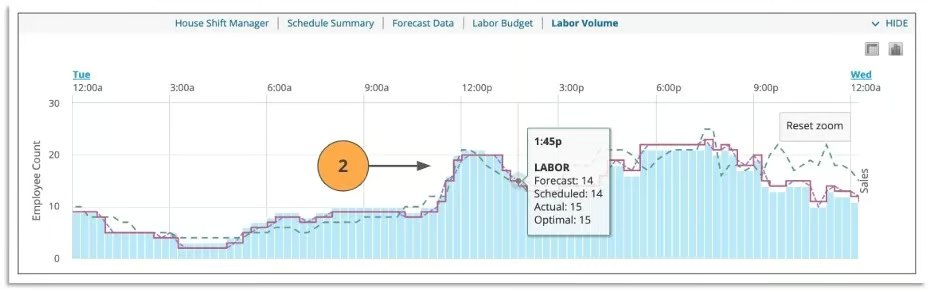
HotSchedules lets you easily review your scheduled employees, forecasted needs, and actual vs optimal numbers. (Source: HotSchedules)
What actual HotSchedules users say
“This application helped me schedule, forecast and receive financial aid and info for my restaurant in Northern Virginia. The system is either web-based or a cell phone app that allows my staff to access information anywhere and for me to see info in real time. The performance gets a lot better with each update. I pay about $3 a month for each user. The support is very easy when needed. The AI is slowly growing but should be helpful in a few years.”— G2 reviewer
“The shortcuts and the ease of use in creating schedules and trends (are what I like best).”— G2 reviewer
Advertisement
How to choose the best restaurant scheduling software for your business
Choosing the right restaurant scheduling software starts with understanding how your restaurant operates day to day. Use the steps below to narrow down the best fit for your business.
1. Determine your restaurant size and staffing needs
Start by looking at how many locations and employees you manage. Some scheduling platforms charge per location, while others charge per employee. A system that’s affordable for a single cafe may become expensive for a multi-location restaurant group. You should also check employee limits on lower-tier plans, especially if you rely on seasonal or part-time workers.
2. Match the software to your restaurant type
Different restaurants have different scheduling challenges. Bars and restaurants serving alcohol may need stronger labor compliance and minor-work protections, while food trucks or catering businesses may prioritize mobile scheduling and GPS tools. Choose software built around your operating model instead of paying for features you won’t use.
3. Prioritize the features your team actually needs
Most restaurant scheduling apps include basic tools like templates, shift swapping, and time-off requests. Beyond that, features vary widely. I recommend focusing first on features that reduce manager workload and prevent scheduling mistakes.
Depending on your operation, you may need:
Auto-scheduling and labor forecasting
POS and payroll integrations
Team messaging and task management
Hiring and onboarding tools
Compliance alerts and overtime controls
4. Evaluate the mobile app experience
Restaurant teams rely heavily on mobile apps to check schedules, swap shifts, and request time off. Before choosing a platform, review the provider’s iOS and Android ratings and look for common complaints about glitches or usability. In my experience, weak mobile apps create communication problems quickly, especially for hourly teams.
5. Decide if you need built-in time tracking or payroll
Many scheduling tools include time clocks and timesheets, but some lock them behind higher-tier plans. If you already use payroll or time tracking software, make sure integrations work smoothly to avoid manual data entry. Some platforms also offer built-in payroll and PTO tracking, which can simplify workforce management.
6. Check integrations with your existing software
Scheduling software works best when it connects with your POS system, payroll platform, accounting software, and HR tools. Integrations help reduce duplicate work and improve labor reporting accuracy. If labor forecasting matters to you, prioritize platforms that sync directly with restaurant POS sales data.
7. Consider how often your schedules change
Restaurants with stable weekly schedules may only need basic scheduling tools. But if your staffing changes frequently because of events, catering, seasonality, or fluctuating traffic, you’ll benefit from stronger automation and communication features. Tools with auto-scheduling, open-shift management, and real-time notifications are especially useful for fast-changing environments.
8. Test the platform before committing
Once you narrow down your options, explore demos, free trials, and mobile apps before making a final decision. I always recommend testing schedule creation, shift swaps, manager approvals, and mobile usability firsthand to see how the software performs in real restaurant workflows.
Methodology: How I evaluated the best restaurant scheduling software and apps
I started my search by looking for scheduling software priced for a family restaurant but with tools that worked for multiple locations and complex needs. I required mobile apps, shift swapping, and time-off planning, but also looked for integrations with the best restaurant POS systems and the ability to keep compliant with labor and health laws.
I use a points-based rubric tied to what restaurants need every week, with scores that roll up across five buckets. I verify claims on pricing and feature pages, Help Centers, and with demos or trials.
Update notes: Here’s how our evaluation system has changed through the years:
May 2026 (current update):
Reworked the comparison table to include restaurant-specific tools
Updated all provider pricing, plan structures, feature availability, and annual billing details to reflect current 2026 information.
Added refreshed user review summaries and updated ratings from G2, Capterra, TrustRadius, and GetApp for each platform.
Expanded “Why I like it” and “What users think” sections for every provider to include stronger hands-on analysis and real-world usability insights.
Rewrote the “How to choose the best restaurant scheduling software” section into a clearer step-by-step buyer guidance format.
October 2025:
Revamped the rubric to the five buckets listed above and expanded the general features and advanced/niche features to explicitly score auto-scheduling and AI-driven demand forecasting.
Rescored providers after re-verifying pricing pages, plan matrices, and Help Center articles; added notes where features sit behind higher tiers.
Considered a dozen providers end-to-end: Homebase, 7shifts, Deputy, SocialSchedules, Sling, When I Work, HotSchedules, Schedulefly, BriskTable, ZoomShift, WhenToWork, and Shyft.
Normalized pricing around a 25-employee scenario since most US restaurants have fewer than 50 employees.
Logged plan gating, integrations, and compliance depth as basic/limited/advanced in the comparison table.
May 2025: I applied an earlier framework patterned around pricing (30%), scheduling functionality (25%), ease of use (25%), reporting (10%), and popularity (10%). I emphasized transparent entry pricing under about $4 per user or $40 per location, required mobile apps with messaging, swaps, PTO, and looked for forecasting and compliance rule-setting. I also reviewed user scores on major software directories and checked for complaints about mobile reliability.
Based on my evaluation, Homebase tops the list with a total score of 4.54 out of 5. It has tools that restaurant managers need, such as employee scheduling, time clocks and sheets, team communication, hiring, onboarding, and labor compliance.
Pricing (30%): I checked free plans or trials offered, starting price for 25 employees, monthly billing availability, transparent pricing, and value at each tier.
General features (30%): Easy scheduling, mobile app, POS and payroll integrations, shift notifications and announcements, employee availability, shift swaps and time-off requests, and labor cost forecasting are data points in this category.
Advanced/niche features (15%): I research each provider’s compliance tools, multi-location support, reporting and analytics, demand forecasting and sales integrations, task management and shift notes, and employee performance and engagement tools.
Support (15%): Customer service hours; live support channels (chat, phone, email); onboarding support or an account manager; Knowledge Base or Help Center; training, webinars, or product demos are verified.
Expert score (10%): My hands-on assessment against the rubric, plus user proof, such as the average rating across at least three sites (Capterra, TrustRadius, G2, GetApp, etc.) and total review count across at least three sources, made up the weighted score of this criteria category.
How I handle tier gating: If a core feature exists only on a higher paid tier, I assign 0.75 instead of 1 and note the minimum tier. Partial implementations score 0.5. If a claim isn’t documented or I can’t verify it in the product or help docs, I don’t award full credit.
Frequently asked questions (FAQs)
Do I need scheduling software?
Perhaps not. If you have a very basic restaurant with set schedules, scheduling restaurant employees with Excel might be possible. However, for larger or more complex restaurants, it’s advised that you choose a scheduling software that offers time and PTO tracking in addition to scheduling. Additionally, this type of scheduling software can help with compliance and proper labor practices, which is important in any business, regardless of size.
Why buy scheduling software for my restaurant?
Restaurant shift apps like those I reviewed can save you time remaking schedules each week, help you avoid scheduling errors, keep you compliant with state labor laws, and make it easier to adapt to sudden or planned employee absences. When they connect to your other software, it’s easier to transfer data for payroll, labor costing, and other analytics.
Are there free restaurant scheduling apps?
Yes. However, most free restaurant scheduling apps have limitations on the number of users, locations, and features.
How is restaurant employee scheduling software different from time tracking software?
Scheduling software is concerned with creating the shift schedule and filling the shifts. Time tracking software involves clocking in and out for shifts. As such, scheduling software has more communication tools for shift swapping, calling in sick, and getting leave approved.
The last bite
The best shift scheduling solution makes it easy to create reliable schedules without overtime errors or compliance violations and empowers employees to find their own covers when needed.
Overall, I found Homebase to be the best scheduling software for restaurants. It’s easy to use for managers and employees and is full of features. With by-location pricing, it’s easy on the budget, too. Try the free version, or jump right in with one of its paid plans.
Agatha Aviso is a seasoned expert in retail, eCommerce, and order fulfillment, with a specialization in payments, POS systems, and eCommerce software. She has collaborated with startups and service-based entrepreneurs on content strategy, offering digital marketing expertise and guiding small business owners in launching their online storefronts.
Beyond consulting, Agatha applies her knowledge firsthand—building her own website as well as ecommerce sites for the platforms she reviews.
Loading more content…
Restaurant HQ is your headquarters for restaurant business advice from industry experts. Learn how to start, run and grow any food and beverage business.
Advertiser Disclosure: Some of the products that appear on this site are from companies from which TechnologyAdvice receives compensation. This compensation may impact how and where products appear on this site including, for example, the order in which they appear. TechnologyAdvice does not include all companies or all types of products available in the marketplace.